SpitePDFA SkipWire Laboratories Invention
Download
Reel 1 · An Introduction

Augustus Skipworth & SkipWire Laboratories proudly present

The Unsubscribed Pencil …for your PDFs!

The big PDF companies would like to rent you a pencil: by the month, with a login, with your papers sent off to their cloud. SpitePDF is a fast, stubbornly offline PDF editor for Mac, iPhone and iPad. You buy it once, like a pencil, and it's yours.

Nobody rents a pencil.
Why rent your PDF editor?

No subscription. No account. No cloud. No follow-up emails. Free to try for fourteen days before a single silver dollar changes hands.

Download on the App Store Download on the Mac App Store
Renewalsnone, ever Accounts requirednone whatsoever Cloudyour own desk Emails from uszero, forever
“In the office of the future, ladies and gentlemen, a man will buy a pencil, and the pencil will simply… write. It will not ask for his email. It will not stop on the first of the month. It will not send him a survey on Tuesday.” The Narrator

Thank you, Narrator, that'll do. Folks, Gus Skipworth. Last Saturday, at the county fair, a boy at an ice cream booth tried to rent me a pencil on behalf of a Very Large Document Company. I went home and built SpitePDF by Monday. You'll want to hear about it. It's just below, and it's shorter than their terms of service.

Augustus Skipworth, interrupting
Reel 2 · The Incident at the County Fair

A True Story, MostlyWho Rents a Pencil?

Saturday afternoon · The county fairgrounds · An ice cream booth

The Founder hands a boy two silver dollars for a butter pecan cone. Before the first lick, the boy wants his mother's maiden name, an email for the “Scoop-Plus” loyalty tier, and $1.99 a month to unlock the bottom of the cone.

The Founder asks to borrow a pencil, to write down the name of the boy's manager.

The boy“Pencils are provided by our partner, a Very Large Document Company. Pencil access is $19.99 a month, billed annually. You'll need to sign in to the pencil. The eraser is Premium.”

The Founder“I have my ice cream cone, young man.”

Read the Founder's full account in the archives ↓

The Narrator Accounts of the incident vary. The boy remembers a man who paid with a 1964 half-dollar and left without his change. SpitePDF also took somewhat longer than a weekend. The pencil has declined to comment.

So, for the record, here is how a pencil is made, according to the Founder, and how many subscriptions it takes.

SKIPWORTH No. 2 · NO SUBSCRIPTION
  1. I

    He chops the tree.

    Cedar, from a hill nobody was using.

  2. II

    He mines the graphite.

    With a shovel he already owned.

  3. III

    He makes the pencil.

    Glues it, paints it yellow, sharpens it.

  4. IV

    That's the end of his involvement.

    He sells it to you and goes home.

Banner over the booth · courtesy of a Very Large Document Company

Pencil+™

  • Pencil access, billed annually$19.99/mo
  • Eraser (Premium tier)$2.99/mo
  • Sharpening, cloud-assisted$1.99/mo
  • Writing in cursiveEnterprise only
  • Pencil login required to drawAlways
  • CancellingBy phone, 2–3 a.m.

Lapsed subscribers may continue to hold the pencil.

“Imagine I came to your house every month to ask whether you'd like to keep using the pencil. Imagine the pencil stopped writing on the first of the month until you'd paid me. You'd call the sheriff, and you'd be right to. A PDF editor is a pencil for paper that happens to live on a screen. I made it, I sold it to you, I went home.” Augustus Skipworth, on pencils

SpitePDF is the pencil. Buy it once. Write with it forever.

Reel 3 · The Four Refusals

Engraved in BrassWhat We Will Not Do

Most products come with a list of features. This one comes with a list of things it declines to do, which the Founder considers the more important list.

Refusal No. 1

No monthly tribute

You pay once. The app is yours. No renewal date, no “your plan is expiring”, no cone-tip lease.

Pay once. Done.
Refusal No. 2

No account

No sign-up, no password, no mother's maiden name. Apple confirms your purchase on your own device and that's the end of the paperwork.

We don't want your email.
Refusal No. 3

No cloud

Your documents stay on your own machine, or wherever you choose to keep them. Text recognition runs on your device. There are no servers of ours for your files to go to.

Your desk, your papers.
Refusal No. 4

No follow-ups

No analytics, no advertising, no tracking, no “how are we doing?” Once you have the app, you'll never hear from us unless you knock on our door.

We are no longer acquaintances.

Meanwhile, back at the fairgroundsThe Booth vs. the Founder

How the subscription booth compares with SpitePDF
TopicThe lad at the boothGus Skipworth
Price“That's $1.99 a month for the bottom of the cone.”One price. Once. The whole cone.
Borrowing a pencil“$19.99 a month, billed annually. Sign in to the pencil.”Here. It's yours. Keep it.
Sign-upMother's maiden name, home address, email.Nothing. Open the app.
Your files“Our cloud assistant would love to read your tax return.”Stay on your machine.
AfterwardLoyalty tier, newsletters, a survey, a second survey.Silence. Blessed silence.
Location check“Download our app to verify you're still in the county.”Works offline, wherever you are.
Reel 4 · The Exhibit Hall

Inside CorePro-Grade Tools. No Hostage Features.

Other PDF apps lock redaction, OCR and scale measurement behind $240-a-year subscriptions. SpitePDF puts the full everyday toolkit in Core, $49.99 once, made for the contracts, drawing sets, tax forms and reports you work on all day.

Exhibit 01 · The Thumb

Built for one thumb.

An iPhone app, not a shrunken desktop. One dock with three controls; the screen edges do the rest.

  • Swipe from the left for pages, outline and search
  • Swipe from the right for the Inspector
  • Swipe the bar to move between open PDFs
  • Day, Night and Sepia themes that keep markup colors true

“A pencil fits in one hand. So should this.” · Gus

iPhone
One dock, three controls · the screen edges do the rest
Exhibit 02 · The Forgiving Search · On-device intelligence

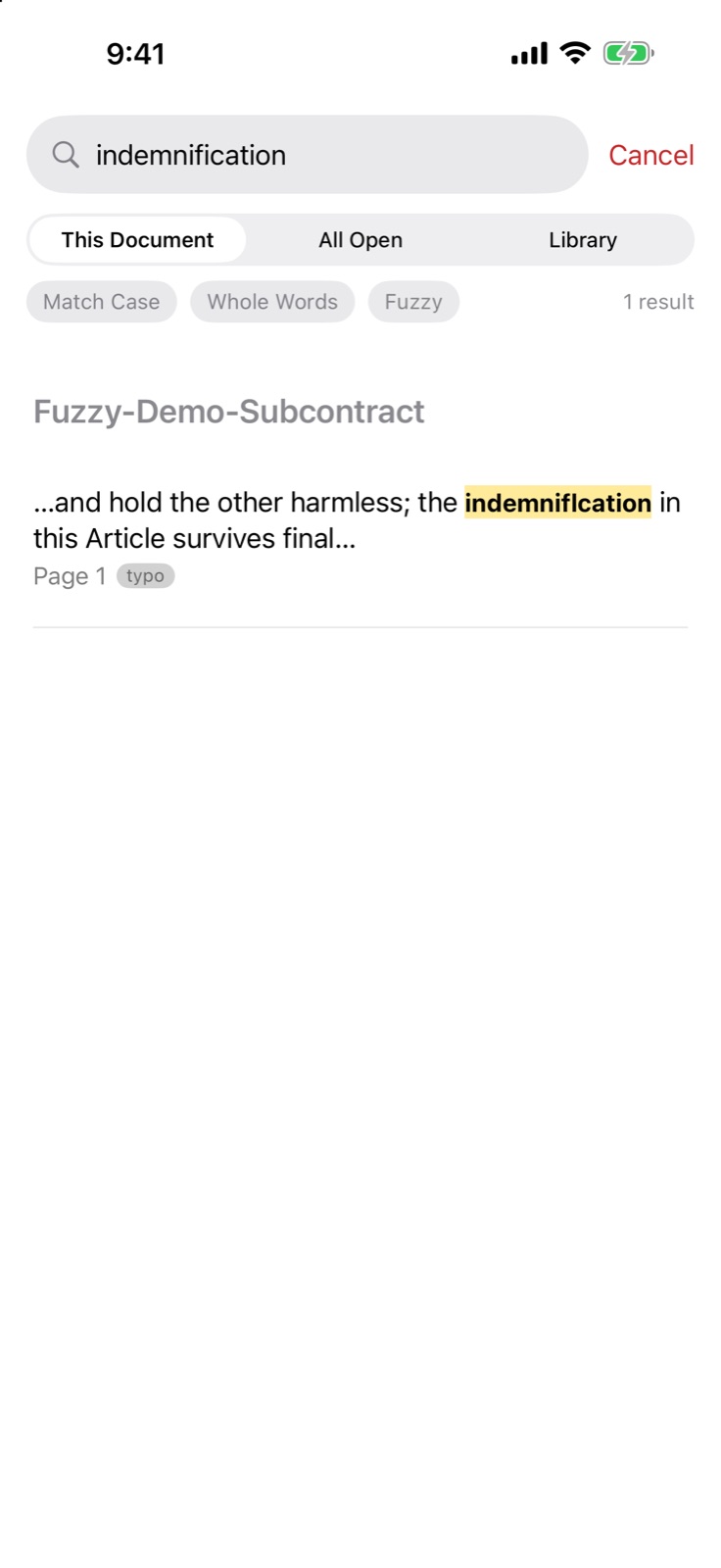
Fuzzy Search: find what you mean when regular search fails.

Turn on Fuzzy and SpitePDF forgives typos, hyphenated line breaks and scanned OCR errors, on Mac, iPhone and iPad.

  • Hyphenated line breaks: “subcon-” at the end of a line and “tractor” on the next is found as subcontractor
  • OCR scan errors and typos: searching “indemnification” finds “indemniflcation”
  • Grammatical forms: terminate also finds terminated and terminating
  • Proximity: “liquidated damages” finds the two terms a few words apart, in either order
  • Technical code shield: A-201, E1.01 and 3.1.2 match only themselves
  • All on your device, with nothing uploaded

“It reads your papers at your desk, not in somebody's data center.” · Gus

iPhoneSpitePDF on iPhone: Fuzzy Search finding matches despite typos and scan errors
Fuzzy Search · forgives typos and scan errors
Exhibit 03 · The Desk

A real Mac app.

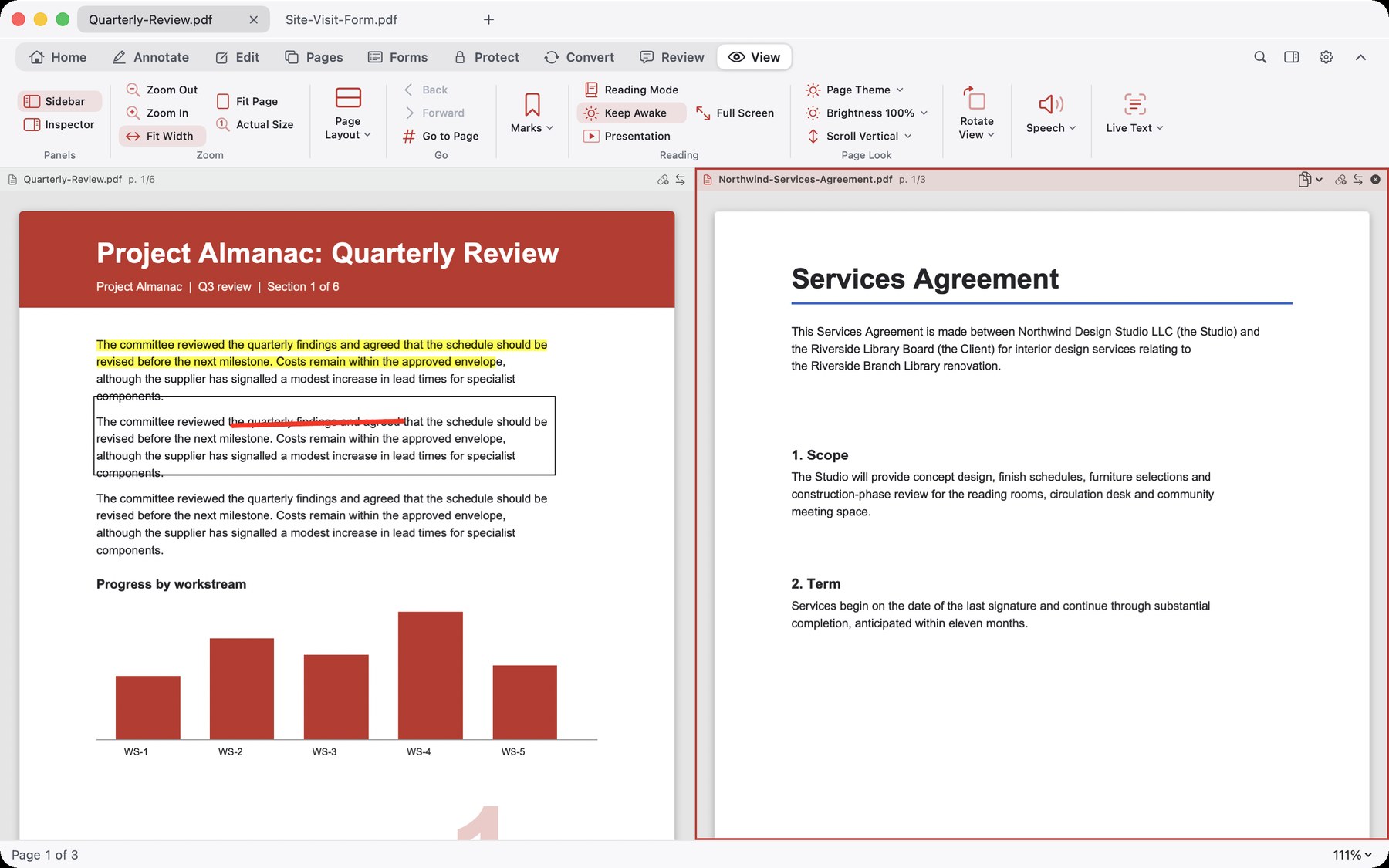
Tabs, split view and a command palette, plus conversion, scan clean-up and automation, all on your Mac with nothing uploaded.

  • Export to Word, Excel, PowerPoint, HTML, text or images
  • Enhance Scan, then turn scans into editable text
  • Batch actions and hot folders
  • Shortcuts, Finder Quick Actions and AppleScript
  • Optional: let Claude drive the app on your Mac, with every edit one Undo and an activity log (off by default)
MacSpitePDF on Mac: two documents open side by side
Side by side · tabs and split view on the Mac
Exhibit 04 · The Eraser

Fix the typo. Combine the files.

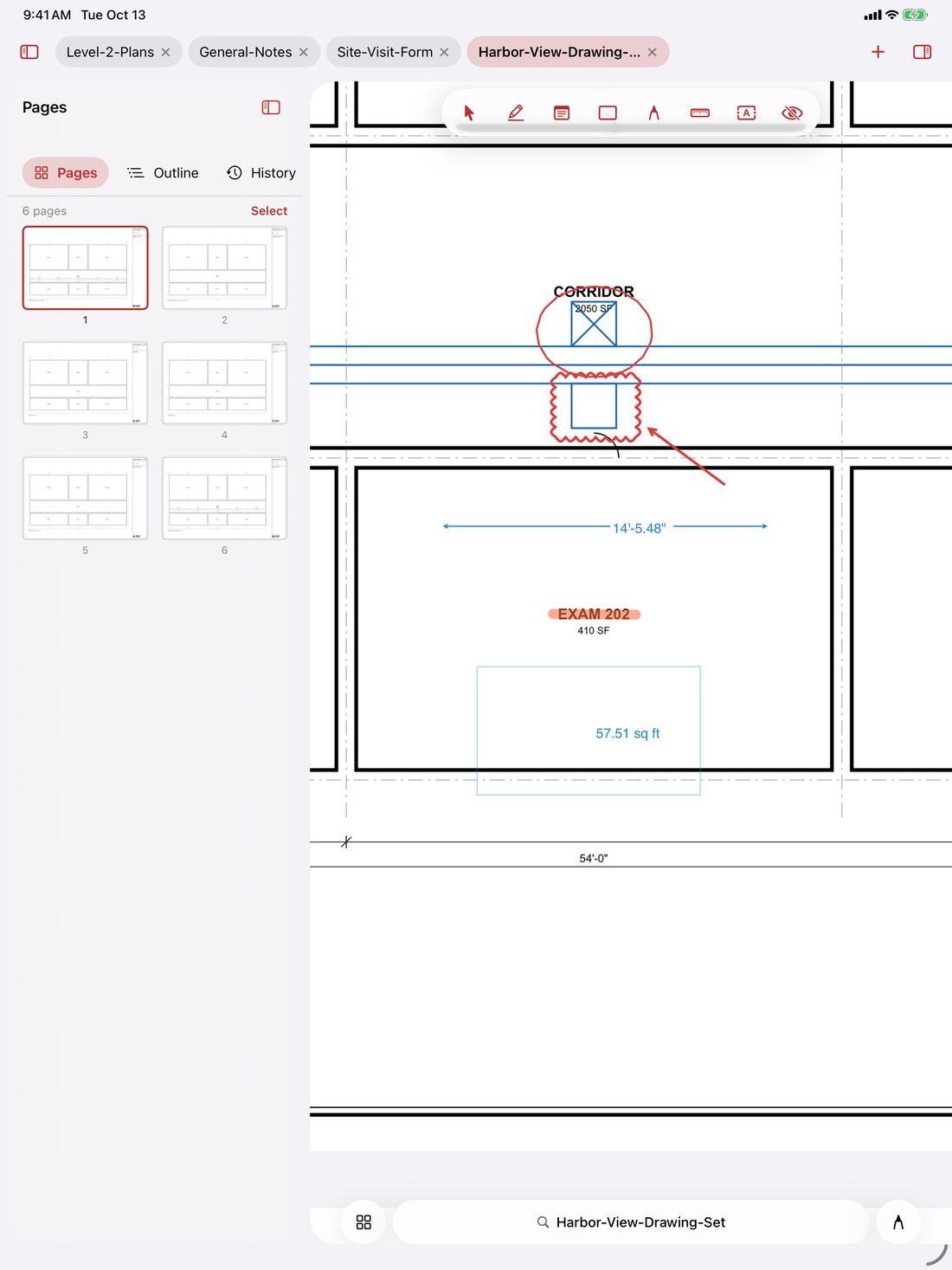
Retype a line on the page, add text anywhere, and put documents together without leaving the app.

  • Edit Text in place with automatic font matching (plus quick single-line fixes on iPhone)
  • Reorder, rotate, duplicate and delete pages
  • Merge files, and extract pages, on Mac, iPhone and iPad
  • On the Mac: insert pages from another file, and split
  • On the Mac: edit pictures and vector shapes on the page

“Every good pencil comes with an eraser. No extra charge.” · Gus

iPadSpitePDF on iPad: the pages drawer open with thumbnails, outline and history
Pages, one swipe away · thumbnails, outline and history
Exhibit 05 · The Redactor

A black box isn't a redaction.

SpitePDF takes the text, vector lines and image pixels out of the file itself, not just out of sight.

  • Finds SSNs, EINs, card numbers, phone numbers and emails in one pass
  • Removes overlapping links and comments
  • Sanitize clears metadata and attachments
  • Check it: redact a word, save, search for it.

“What's under the box is nobody's business. Least of all ours.” · Gus

iPhone
Find personal data · SSNs, EINs, phone numbers, emails
Exhibit 06 · The Surveyor

Drawings, to scale.

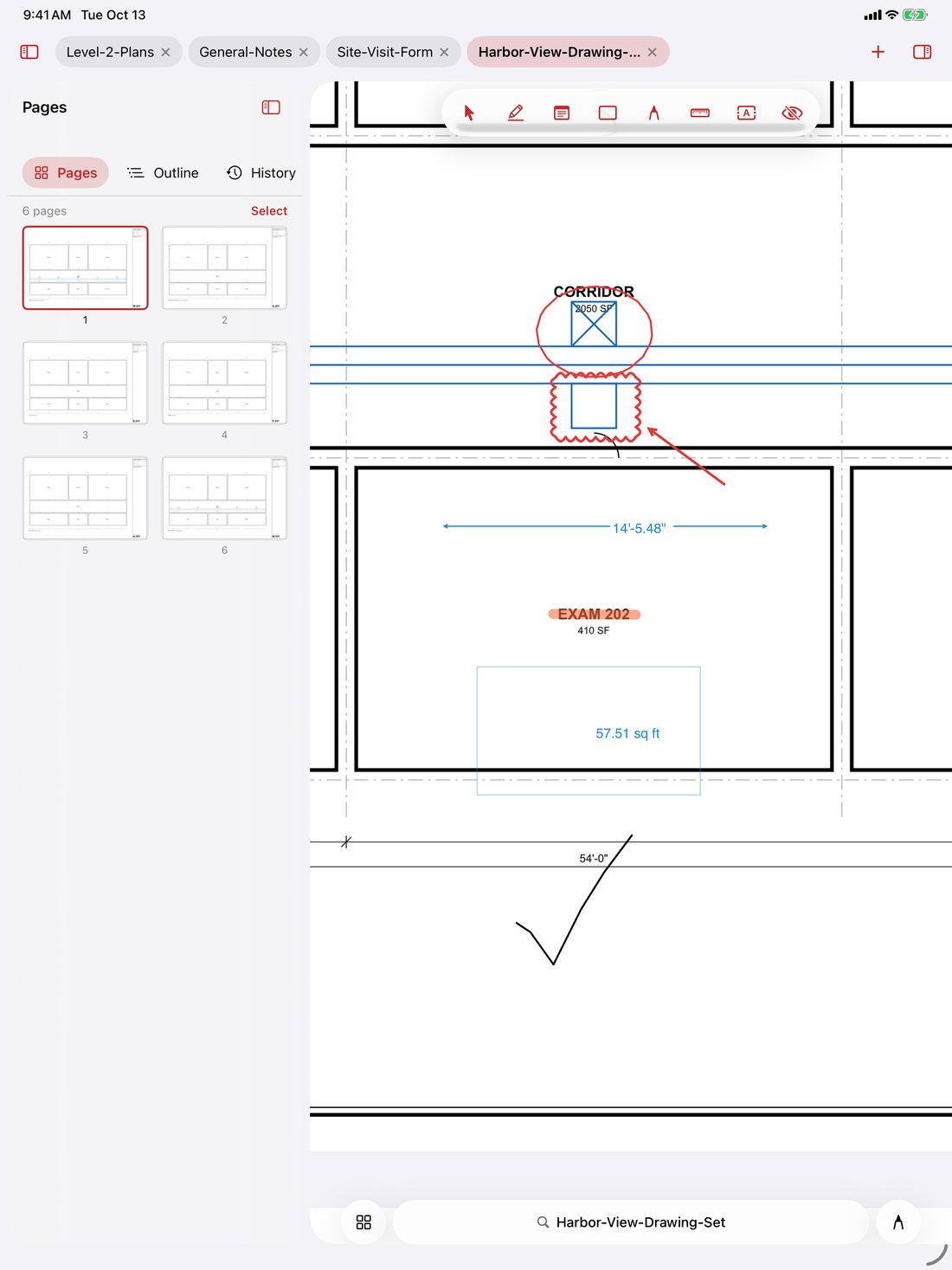
Calibrate a sheet, then measure lengths, perimeters and areas right on the drawing, with Apple Pencil on iPad.

  • Architectural, engineering, metric or custom scales, like 1/4″ = 1′-0″
  • Clouds, callouts, threaded replies and XFDF exchange
  • Compare two revisions by text or visually, on Mac, iPhone and iPad
  • Show and hide drawing layers on Mac, iPhone and iPad
  • On the Mac: measurement totals to CSV or XML

Bid or close out jobs for a living? See what Pro adds (Takeoff, Review).

iPadSpitePDF on iPad: a floor plan zoomed in, still sharp
Big drawings, razor sharp · zoom in without the blur
Exhibit 07 · The Signatory

Sign it properly. Send it finished.

Fill and calculate forms, sign with a certificate, and lock the file down before it goes out.

  • Certificate signatures (PAdES) with timestamps on Mac, iPhone and iPad; verification and long-term validation on the Mac
  • Create and edit form fields, and import and export form data, on Mac, iPhone and iPad
  • On the Mac: detect fields on flat pages and scans, add barcode fields
  • AES-256 password protection
  • Print preflight for PDF/X and PDF/A, with Output Preview, on Mac, iPhone and iPad

Filing with a court or sending files to press? See what Pro adds (Counsel, Press).

“No account required to sign your own name. Imagine.” · Gus

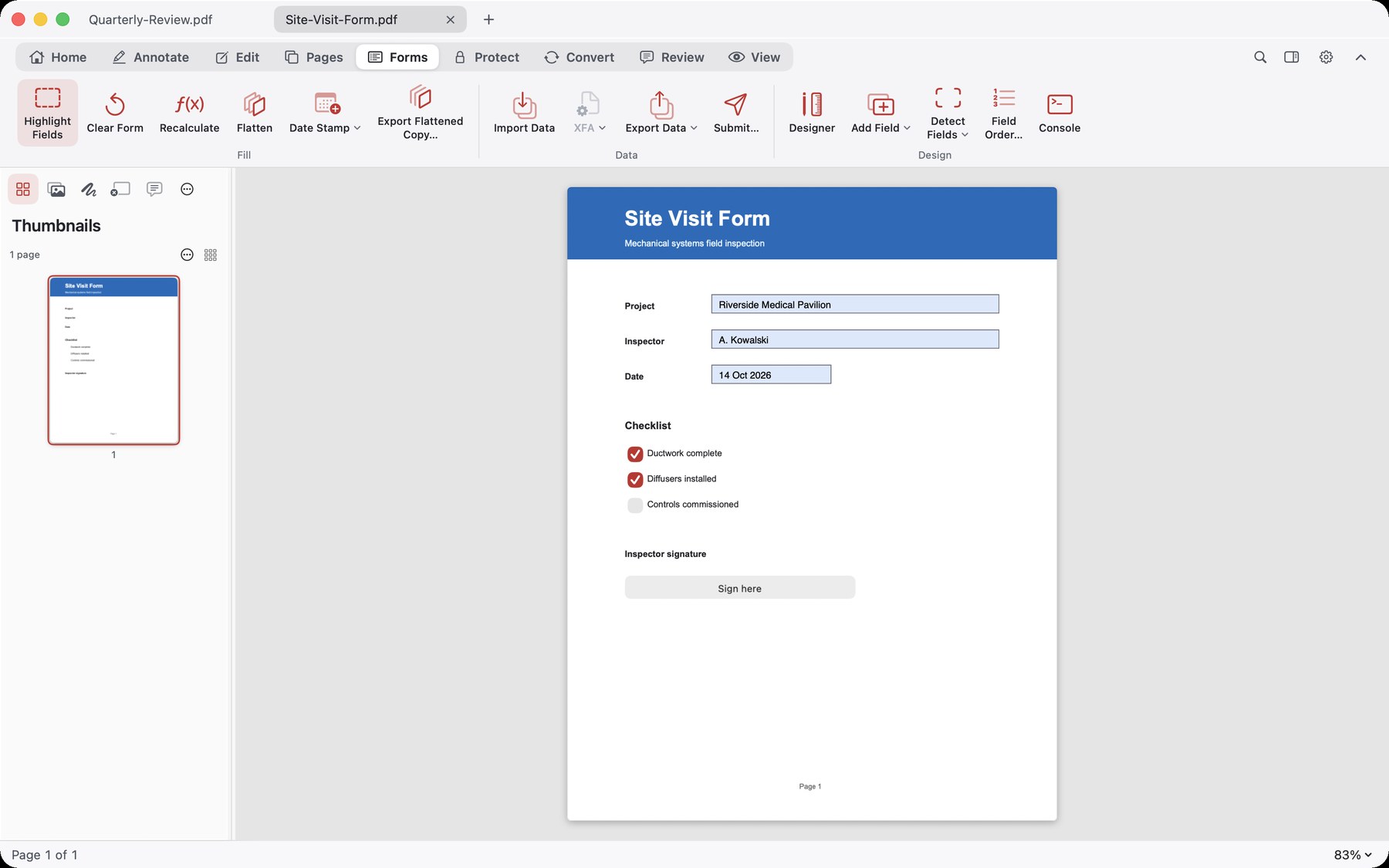
MacSpitePDF on Mac: a form filled in, with a signature
Fill any form · type, tick and sign

And the rest of the pencil caseAlso in Core

  • Text boxes and typewriter text
  • Highlights, notes, shapes and Pencil ink
  • Comment list with filters and replies
  • Your own stamps, with a shareable library (Mac)
  • Voice notes and multi-leader callouts
  • Headers, footers, watermarks
  • Bates numbering
  • Links, added one by one on every device, or all at once on the Mac
  • Page labels on every device; crop, margins and paper size on the Mac
  • N-up and poster layouts (Mac)
  • Fuzzy Search for typos, line-break hyphens and scan errors
  • Searchable scans (OCR) on your device
  • Reduce file size, with target MB and size estimates
  • PDFs from pictures and web pages (Mac)
  • Auto-tagging, alt text and a basic accessibility check (Mac)
  • Continuity Camera scanning (Mac)
  • Flatten marks into the page, in place or as a copy
  • PDF Portfolios: open them, and build one on Mac, iPhone and iPad
Reel 4½ · The Drafting Kit

SpitePDF ProFor People Who Bill With Their Tools

Core is the pencil. Pro is the whole drafting kit. Instead of paying hundreds of dollars a year for separate trade tools, Pro bundles all five specialist workbenches below, plus everything in Core, into one purchase: $149.99 once, intro price through January 1, 2027 (regular $199.99). The workbenches are included in Pro, not sold separately.

Workbench 1

Takeoff

Estimators, subcontractors, field PMs

Measure, count and price a set of plans, right on the sheet.

Mac · essentials on iPhone and iPad
  • Count tool with symbols and count groups
  • Quantity legend placed on the sheet
  • Markup list with custom columns, unit costs and Excel (.xlsx) export
  • Per-viewport scales on one sheet

Already in Core: scale calibration, length, perimeter and area measuring, CSV or XML totals on the Mac, clouds and callouts.

Workbench 2

Review

Engineers and architects doing submittals and closeout

Run submittal review and closeout, from stamps to the binder.

Mac · essentials on iPhone and iPad
  • Review Register: a numbered comment register, exported to CSV, XLSX or PDF
  • Sheet Index read from title blocks, with bookmarks and page labels
  • Comment-response letter, as Word, PDF or Excel
  • Slip-sheeting that carries your markups onto revised sheets

Already in Core: page organizer, comment list with filters and replies, review statuses and your own stamps.

Workbench 3

Counsel

Solo and small-firm lawyers

Produce, redact and file court documents with confidence.

Mac · essentials on iPhone and iPad
  • Exhibit stickers
  • Production sets with Bates numbering and DAT and OPT load files
  • Privilege and redaction logs that record reasons
  • Transcript page:line citations

Already in Core: true redaction, the one-pass personal-data finder, Sanitize, plain Bates numbering and certificate signing.

Outputs carry no visible SpitePDF branding.

Workbench 4

Access

ADA Title II and WCAG 2.1 AA remediation

Fix PDFs for accessibility remediation work.

Mac · checker on iPhone and iPad
  • Tag tree and reading-order editor
  • Table-header editor
  • WCAG 2.1 AA and Matterhorn checker with an exportable report
  • Fix all safe issues in one step

Already in Core: auto-tagging, document language, a basic accessibility check, typed alt text and the bookmark editor.

Does not guarantee compliance. Where a check cannot be evaluated it says “needs manual check”; confirm with an independent PDF/UA checker.

Workbench 5

Press

Specialty and commercial printing: designers, print shops, self-publishers

For specialty printing, not office printing.

Get files press-ready for a commercial printer, print shop or book publisher: preflight, fix and impose. You don't need it to print on your own printer.

Mac · PDF/X conversion on iPhone and iPad
  • Press-spec checks for PDF/X-1a, X-3 and X-4, with ICC profile
  • Fix-ups: RGB to CMYK, add bleed, outline fonts, repair hairlines
  • Ink-coverage heat map
  • KDP and IngramSpark profiles

Already in Core: PDF/X and PDF/A preflight, Output Preview, crop and margin controls, and N-up and poster layouts.

Structural checks, not a certified validator. Check your printer's current spec before you send files.

The whole kit

One purchase. All five.

SpitePDF Pro includes Takeoff, Review, Counsel, Access and Press, plus everything in Core: $149.99 once.

Own Core already? The Pro Upgrade adds all five for $99.99.

Access and Press run mainly on the Mac; the accessibility checker and Convert to PDF/X also run on iPhone and iPad. Buying for a team? Each person buys on the App Store; Apple's emailed receipt is the invoice.

“Most people only need the pencil. If you draw for a living, take the whole kit.” · Gus

See the Ledger
Reel 5 · The Ledger

Simple, HonestOne Payment. Then We Part.

Try everything free for fourteen days: every tool, no watermarks. Then pay once, in the app, through Apple. One purchase covers iPhone, iPad and Mac.

SpitePDF Core

The whole editor, for nearly everyone
$49.99once
Introductory price through January 1, 2027. $79.99 after.
  • Mark up, redact, sign, fill, merge, split, OCR
  • Certificate signatures and Bates numbering
  • Measure to scale, compare revisions
  • iPhone, iPad and Mac
A pencil. Yours.
The whole kit

SpitePDF Pro

Core, plus the trade workbenches
$149.99once
Introductory price through January 1, 2027. $199.99 after. The pencil and the whole drafting kit.

Pro Upgrade

For people who already own Core
$99.99once
Introductory price through January 1, 2027. $119.99 after.
  • Adds all five Pro workbenches to the Core you already own
  • Bought in the app, like everything else
The rest of the kit, later.

US prices. Local prices are set by the App Store and the app always shows the live price before you pay. Apple's emailed receipt is the only email this transaction will ever produce, and frankly, that one is Apple's doing.

The Founder's three-year arithmetic

A typical PDF subscription at $19.99 a month, for 36 months
$719.64
SpitePDF Core, paid once
$49.99

And in year four the subscription bill keeps coming, while SpitePDF keeps quiet.

Reel 6 · Questions From the Audience

You in the BackQuestions, Answered Briefly

Do I really never get an email?

Really. We don't collect your address, so there's nothing to send to. Apple sends its own purchase receipt. That's between you and Apple. We are not cc'd.

Do I need to make an account?

No. There is no SpitePDF account. Your purchase is tied to your Apple Account, which you already have. To move to a new device, open SpitePDF and tap Restore Purchases in Settings.

Does it work offline?

Yes. The PDF engine does its work on your device. The network is used only when you ask for something that needs it, such as a signature timestamp, a certificate check, submitting a form, or turning a web page into a PDF.

What happens after the fourteen-day trial if I don't buy?

You can keep reading PDFs. The editing tools wait politely. Nobody chases you. Nobody asks how the cone performed.

Which devices does it run on?

iPhone (iOS 18 or later), iPad (iPadOS 18 or later) and Mac (macOS 14 or later). One purchase covers all three.

Do I need Pro?

Probably not. Core is the complete PDF editor, redaction, OCR, certificate signing and scale measuring included. Pro is for people who do takeoffs, submittal review, court productions, accessibility remediation or commercial print work for a living. See the five workbenches.

Will the price go up?

The introductory prices hold through January 1, 2027. After that Core is $79.99, Pro is $199.99 and the Pro Upgrade is $119.99. Whatever you paid, you never pay it again.

Did Mr. Skipworth really invent the pencil?

He says so. The Narrator has asked us to point out that the pencil is roughly four hundred years older than Mr. Skipworth. Mr. Skipworth has asked us to point out that the Narrator wasn't there.

Is Augustus Skipworth a real person?

He would prefer you didn't ask. SpitePDF is real, though, and it really doesn't want your email.

Reel 7 · Optional Viewing

ArchivesThe Founder's Archives

None of this is required to use SpitePDF. Mr. Skipworth insisted it be kept anyway.

Reel 2½ · A Personal Letter From the Desk of the Founder The Incident at the County Fair, in full · Typed on the office Remington · Butter pecan stains included
From the desk of
Augustus Skipworth
Proprietor, SkipWire Laboratories

I went down to the county fairgrounds on Saturday afternoon with one simple, honorable objective: I wanted a scoop of butter pecan in a waffle cone.

I walked up to the booth. I handed the lad behind the counter two silver dollars. He scooped the cream, set it into the cone, and placed it squarely into my hand.

In any civilized society, that is the end of the story. Money changes hands, goods are delivered, two men tip their hats, and we go our separate ways until death or another craving for butter pecan brings us back together.

Instead, the boy leans over the counter like we're about to negotiate the Treaty of Versailles.

“Now, sir,” he says, “before you take a lick, I just need your mother's maiden name, your home address, and an email so we can enroll you in our ‘Scoop-Plus’ loyalty tier. Also, the cone itself is leased, so if you'd like to unlock the bottom tip where the melted ice cream collects, that's $1.99 a month, and you'll need to download our mobile app to verify you're still in the county.”

Now, I am a reasonable man. I asked to borrow a pencil, so I could write down the name of his manager.

He pointed at a banner hanging over the booth. “Pencils are provided by our partner, a Very Large Document Company,” he says. “Pencil access is $19.99 a month, billed annually. You'll need an account to sign in to the pencil. The eraser is in the Premium tier. And they'd like to keep a copy of whatever you write, in their cloud, to help improve the pencil.”

I stood there in the dirt, butter pecan starting to drip down my knuckles, staring at this kid. I didn't get angry. I didn't raise my voice. I just looked him dead in the eye and said:

“I have my ice cream cone, young man.”

He blinked. “Excuse me?”

“I have my ice cream cone, young man. You have my two dollars. Our business is concluded. We are no longer acquaintances. Do not write to me. Do not follow me home. Do not ask me how the cone performed on a scale of one to ten. And you may tell your partner that I have used the same pencil since 1952. I made it myself, I charged myself a nickel for it, and I paid in full. It has never once asked me for my email.”

And then I turned around and walked away.

Somewhere along the line, the modern world forgot how to finish a transaction. The man who makes a pencil chops the tree, mines the graphite, makes the pencil and sells it to you, and that is the end of his involvement. But the big document companies want to rent you the pencil. They want an account. They want a monthly tribute. They want to know what you're writing, where you're keeping it, and whether you'd like their “cloud assistant” to read your private tax returns.

At SkipWire Laboratories, we practice the lost art of minding our own business. That is why I went home and built SpitePDF: a pencil for paper that happens to live on a screen. It took me the weekend. Give or take.

You hand me your money. I hand you the pencil. You have your ice cream cone. Now go enjoy it in peace.

Gus SkipworthFounder, Chairman, and owner of one nickel pencil, paid in full
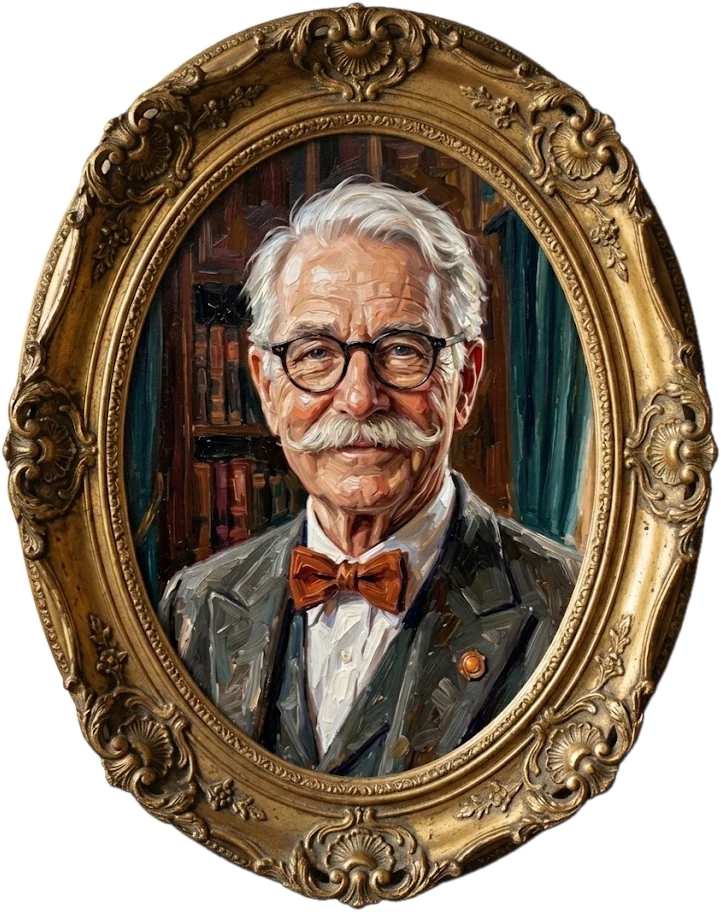
Reel 3½ · The Portrait Gallery Augustus “Gus” Skipworth Oil on canvas · Commissioned by the subject · Approved by the subject
Oil portrait of Augustus Skipworth in an ornate gilt oval frame, wearing an orange bow tie
The Founder, shortly before the Incident at the County Fair

Gus Skipworth is the proprietor of SkipWire Laboratories, a Division of Tomorrow, which also gave the world SkipWire: your own computer, delivered by wire to any screen in the house. He has a habit of inventing things that do their job and then get out of the way, and a habit of inventing things that were already invented.

  • EarliestThe Pencil, sold outright, no subscription, as God intended (disputed)
  • EarlierThe Moon Telephone (still waiting on the moon)
  • EarlierThe Long-Distance Hand
  • EarlierThe Agreeable Butler
  • LatelySkipWire: your desk, wherever you go
  • NowSpitePDF: a PDF editor that finishes the transaction
Reel 4¼ · The Skipworth Pencil Collection Six Pencils, Each Entirely Different Each one now a SpitePDF app icon · Mr. Skipworth can tell them apart
SpitePDF icon with No. 2
No. 2Standard issue. The main icon.
SpitePDF icon with The Editor's Red
The Editor's RedFor marking up other people's mistakes.
SpitePDF icon with The Carpenter's Flat
The Carpenter's FlatWill not roll off a drawing set.
SpitePDF icon with The Golf Stub
The Golf StubFree at the clubhouse. Here, also free.
SpitePDF icon with The Permanent Pencil, which is a pen
The Permanent PencilIt's a pen. It cannot be erased. Mr. Skipworth counts it anyway.
SpitePDF icon with The Astronaut
The AstronautNo space pen required. Writes upside down.

The Narrator The six icons are identical except for the pencil. Mr. Skipworth maintains that this is the whole point, and that you will know which one to pick.

Reel 7½ · Correspondence

Join Our Mailing List

Stay up to date with news, offers and inspiring stories from the SpitePDF family.